
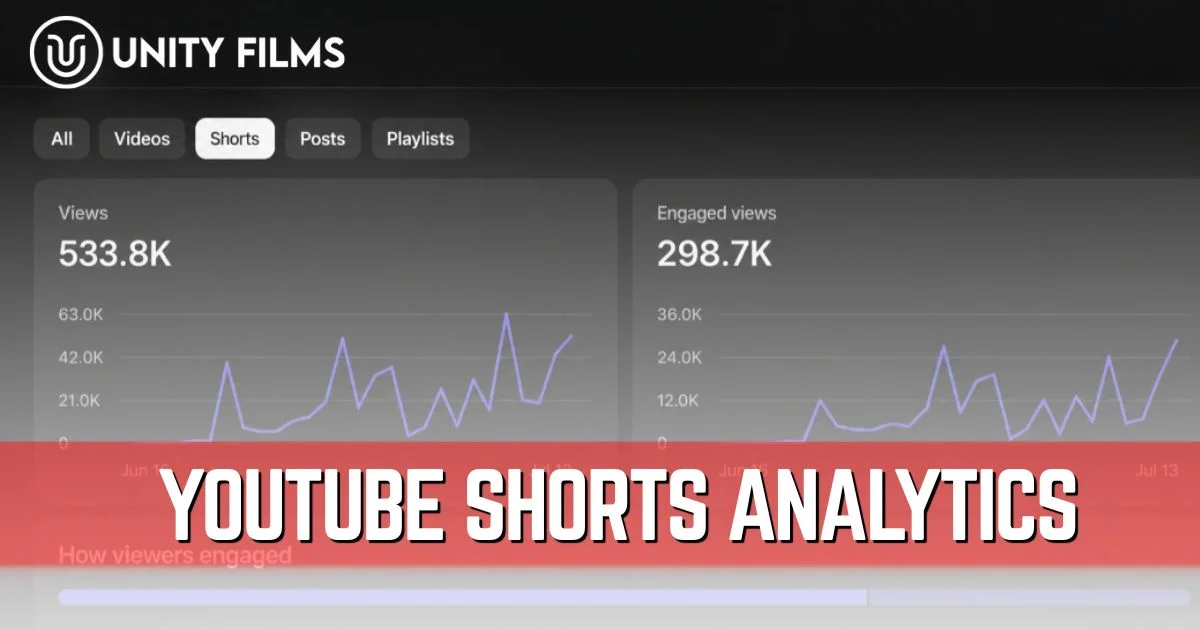
Most creators check their YouTube Shorts analytics the same way they check the weather quick glance, decide if it’s good or bad, move on. That habit hides the real story behind every Short. The dashboard isn’t decoration. It’s the only honest feedback you get about whether a Short is genuinely working or just generating empty view counts.
The bigger problem in 2026 is that YouTube Shorts analytics changed how the numbers themselves work. Views don’t mean what they used to. A Short with 100,000 views can be quietly failing, while a Short with 20,000 views can be on its way to compounding distribution for weeks. Read the wrong metrics and you’ll make the wrong decisions for months.
Across channels we’ve worked on, the creators who grow on Shorts share one habit: they ignore raw view counts and focus on three specific signals that actually predict distribution. This guide breaks down every metric in your Shorts dashboard, what’s changed in 2026, which numbers genuinely matter, and the contrarian truth that explains why most viral Shorts don’t lead to channel growth.
The 2025 View Counting Change That Reset Shorts Analytics
Before any benchmarks make sense, you need to know what changed. On March 31, 2025, YouTube updated how Shorts views are counted, removing the previous minimum watch time requirement. Now any time a Short starts playing or replays, that counts as a view.
That sounds like a small technical detail. It’s not.
YouTube also introduced a second metric called Engaged Views, which keeps the older definition (viewer interacts meaningfully or watches beyond a few seconds). The critical part most creators missed: YouTube Partner Program eligibility and Shorts ad revenue sharing are based on Engaged Views, not the new views metric. Your view count can look inflated by passive loops while your monetization-relevant metric tells a completely different story.
| Metric | What It Counts | Used For |
|---|---|---|
| Views | Every play or replay (no minimum) | Distribution signal, vanity metric |
| Engaged Views | Meaningful interaction or longer watch | YPP eligibility, ad revenue |
Honestly, the line between the two metrics is fuzzier than YouTube’s documentation makes it sound. What’s clear is that creators relying on older retention guides written before this change are working with definitions that no longer apply.
The 8 YouTube Shorts Analytics Metrics That Actually Matter
YouTube Studio shows over a dozen Shorts metrics. Most of them are outcomes of two or three core signals. Focus your attention here and the rest will sort itself out.
1. Viewed vs Swiped Away
This is the single most important metric in YouTube Shorts analytics. It shows the percentage of viewers who chose to watch your Short versus those who scrolled past it in the feed.
Where to find it: YouTube Studio → Content → Shorts → click any Short → Analytics Healthy benchmark for 2026: Below 30% swipe-away rate
According to creator analyst data published by Tubular, Shorts with swipe-away rates under 30% received roughly 4x the sustained distribution of Shorts with swipe-away over 50%, regardless of initial view counts. That’s a brutal multiplier. Hook failure in the first 1-2 seconds is the most common reason this metric tanks.
2. Average Percentage Viewed (APV)
For Shorts, percentage viewed replaces raw average view duration as the primary retention metric. It tells you what fraction of your Short the average viewer actually watched.
Where to find it: Analytics → Engagement tab Healthy benchmark: Above 70% for 2026
Above 100% means viewers are replaying your Short, which is one of the strongest positive signals available. A Short with 110% average percentage viewed is being watched more than once on average, and YouTube reads that as gold.
3. Engaged Views
As mentioned above, this is your true quality metric. It strips out the passive loops and counts viewers who actually engaged with the content.
Where to find it: Analytics → Overview, alongside the regular views count Why it matters: This is the metric tied to monetization eligibility, not raw views
Track Engaged Views as your stable comparison number across Shorts. Raw views fluctuate based on autoplay behavior; Engaged Views reflect actual viewer interest.
4. Audience Retention Graph
The retention graph shows you second-by-second where viewers drop off. While APV gives you one summary number, this graph shows you the full story behind that number.
Where to find it: Engagement tab → audience retention report
Read it like this:
- Drop in first 2 seconds = hook failed, the opening frame or first words didn’t deliver
- Drop in the middle = pacing lagged, viewers got bored
- Spike at the end = viewers rewatched, which is a winning signal worth replicating
5. Shorts Feed Performance
This shows how often your Shorts are getting surfaced in the main Shorts feed, which is where the bulk of Shorts traffic comes from for most creators.
Where to find it: Reach tab → Traffic source types
A channel pulling almost all Shorts traffic from the feed is normal but fragile. A channel that also pulls traffic from search and external sources is more resilient to algorithm shifts.
6. Subscriber Conversion Rate
Shorts convert viewers to subscribers at a much lower rate than long-form videos. That’s not your fault Shorts viewers scroll fast and most aren’t deeply invested in the creator yet.
Where to find it: Audience tab → Subscribers gained Healthy benchmark: 0.5% (5 subs per 1,000 views) is above average; above 1% is exceptional
The fix isn’t a louder subscribe call to action. It’s a specific reason to subscribe. “Follow for more of this exact topic” beats “subscribe for more videos” every time.
7. Likes-to-View Ratio
Engagement on Shorts is more passive than on long-form, so the ratio is naturally lower.
Healthy benchmark: 3-6% like-to-view ratio. Above 6% is strong.
Below 2% suggests the content isn’t resonating emotionally even when people are watching. Likes carry less algorithmic weight than retention and swipe-away, so don’t over-index on this number.
8. Shares per View
Shares are the strongest organic growth signal because they extend reach beyond YouTube itself. A viewer who shares your Short is essentially recommending you to their network.
Where to find it: Engagement tab
Probably more important than chasing likes is paying attention to shares. A Short with a modest like rate but a strong share rate is often a sleeper hit the algorithm will keep pushing for weeks.
YouTube Shorts Analytics Benchmarks Reference Table (2026)
Use this YouTube Shorts analytics benchmark sheet as your quick reference whenever you open Studio:
| Metric | Healthy 2026 Benchmark | What It Signals |
|---|---|---|
| Swipe-Away Rate | Below 30% | Hook + opening frame strength |
| Average Percentage Viewed | Above 70% | Retention quality |
| Retention (first 3 seconds) | Above 80% | Stop-the-swipe power |
| Like-to-View Ratio | 3-6% | Emotional resonance |
| Subscriber Conversion | 0.5%+ | Audience fit |
| Engaged Views | Higher than raw views/2 | True quality reach |
These benchmarks are where YouTube’s algorithm starts distributing Shorts significantly more broadly. Creators who consistently hit them see compounding reach growth over weeks.
How to Access YouTube Shorts Analytics
The data is sitting in YouTube Studio for free. Most creators never venture beyond the Overview tab, which is where most of the deeper insights actually live.
From desktop:
- Step 1: Sign in to YouTube Studio
- Step 2: Click Content in the left menu
- Step 3: Filter by Shorts at the top
- Step 4: Click the analytics icon next to any Short for detailed metrics
- Step 5: Use Advanced mode in the top-right corner for deeper filtering
From mobile, the YouTube Studio app is a separate download from the regular YouTube app. Tap Analytics at the bottom, then swipe to the Shorts view.
YouTube’s Creator Academy also publishes free walkthroughs of the analytics dashboard if you want a more visual tour from the platform itself.
How to Diagnose a Failing Short
A Short that’s underperforming usually shows one of four patterns in the data. Match the symptom to the fix.
| Symptom | Likely Problem | Fix |
|---|---|---|
| High views, low APV | Weak hook, viewers swiping in seconds | Rewrite opening frame and first 2 seconds |
| Decent APV, low subscribers | Audience fit problem | Tighten what your channel promises |
| Low impressions overall | Past Shorts underperformed | Improve packaging on next 3-5 uploads |
| Strong APV, no shares | Content doesn’t trigger emotion | Add stronger hook or memorable payoff |
If your Shorts are pulling views but not subscribers, that’s a content fit problem, not an algorithm problem. The audience is finding you but not connecting your Short to the rest of your channel. Our YouTube channel name ideas guide and YouTube SEO checklist cover the upstream pieces that affect this conversion.
The Contrarian Truth About YouTube Shorts Analytics
This is where most Shorts guides get it wrong. They treat views as the goal. They aren’t.
After the 2025 view counting change, raw view counts on Shorts mean less than ever. A Short with 100,000 views and 55% swipe-away is failing. A Short with 20,000 views and 25% swipe-away is winning, and will likely keep growing for weeks because the algorithm recognizes the quality signal.
The honest hierarchy looks more like this:
- 70% of distribution comes from swipe-away rate and APV. Fix these two and everything else compounds.
- 20% from satisfaction signals like shares, comments, and re-watches.
- 10% from raw views, likes, and subscriber count combined. These are outcomes, not inputs.
I’m not 100% convinced these exact percentages hold for every niche — comedy and surprise-ending Shorts may weight rewatches even higher, while educational Shorts lean on completion. But the general pattern holds across creator analysts.
Most beginners chase Shorts that get the most views. Smart creators chase Shorts with the lowest swipe-away rate. The first feels like growth and is often a trap. The second compounds quietly for months. If you want help connecting your Shorts success back into long-form session time, our YouTube end screen strategy walks through how to convert one viewer into a binge session.
Frequently Asked Questions
What is the most important YouTube Shorts analytics metric?
Viewed vs swiped away is the single most important metric, because it measures whether your hook stopped the scroll. According to industry data, Shorts with swipe-away rates under 30% received about 4x the sustained distribution of Shorts above 50%. Fix this first before worrying about anything else.
Did YouTube change how Shorts views are counted?
Yes. On March 31, 2025, YouTube updated Shorts to count any play or replay as a view, with no minimum watch time. They also introduced Engaged Views as a separate metric tied to monetization. Older retention guides written before this change use definitions that no longer apply.
What is a good APV for YouTube Shorts in 2026?
Above 70% average percentage viewed is strong, and above 100% means viewers are replaying your Short, which is one of the strongest algorithmic signals available. Below 50% indicates a structural issue with either the hook, pacing, or content delivery.
Why are my Shorts getting views but no subscribers?
That’s a content fit problem, not an algorithm problem. Viewers are finding your Short but aren’t connecting it to the rest of your channel. Tighten the relationship between what your Short delivers and what your channel promises, and offer a specific reason to subscribe rather than a generic call to action.
How do I access Shorts analytics in YouTube Studio?
Open YouTube Studio, click Content in the sidebar, filter by Shorts at the top, then click the analytics icon next to any Short. For aggregate Shorts performance across the whole channel, click Analytics in the sidebar and switch to the Shorts tab.
Also Read: YouTube Channel Stats: The Metrics That Actually Matter and How to Read Them in 2026
Final Thoughts
YouTube Shorts analytics aren’t there to make you feel good about a view count screenshot. They’re the only honest feedback loop telling you whether viewers actually wanted what you made.
The shift is psychological. Stop celebrating raw views. Start celebrating the swipe-away rate. The algorithm rewards what viewers genuinely choose to watch, not what gets accidentally autoplayed past their thumb.
So pick two metrics this week: swipe-away rate and APV. Track them across your last five Shorts, find the worst performer, and rewrite the first two seconds of your next upload. Or if you’d rather hand the whole Shorts strategy and analytics off, Unity Films YouTube Management Services covers short-form optimization end to end so you can focus on creating.