
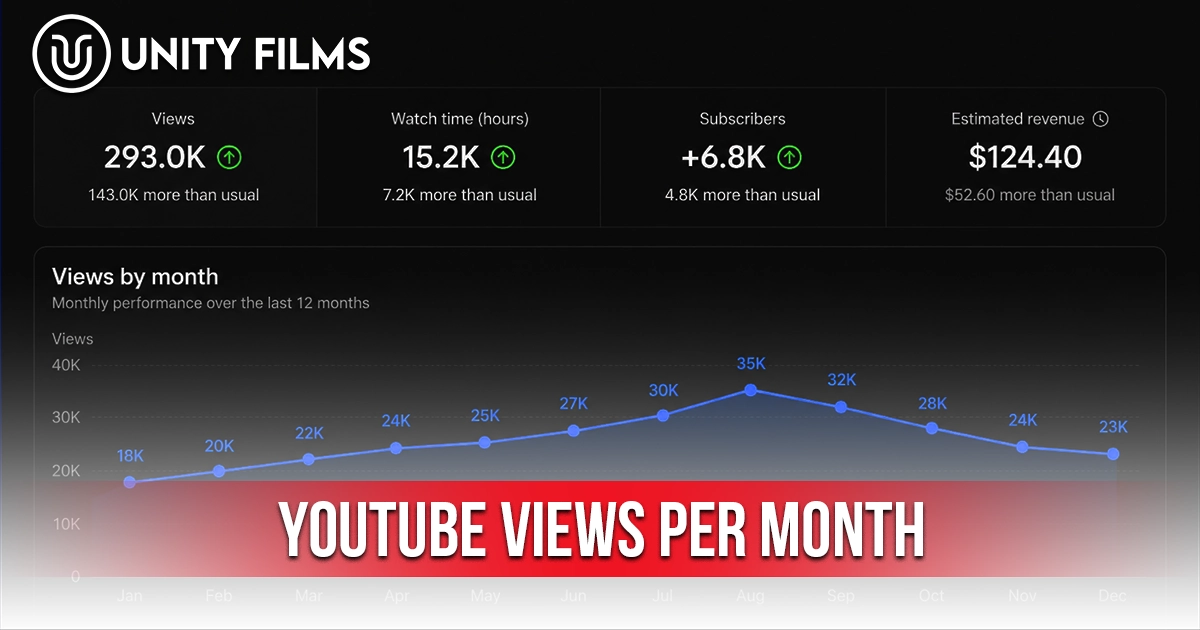
Most creators check their daily views obsessively, glance at weekly numbers occasionally, and rarely think about monthly totals at all. The honest truth is the opposite is what works. Daily views are emotion. Weekly views are tactics. YouTube views per month is the strategic metric the one that actually decides revenue forecasts, sponsorship pitches, and whether your channel direction needs a pivot.
Across channels we’ve worked on, the gap between creators stuck at the same income for years and those genuinely scaling up usually shows up in how they track monthly views. Monthly views translate directly into money through ad revenue calculations, sponsorship rate cards, and brand deal negotiations. When a sponsor asks for your media kit, they’re looking at monthly views. When you decide whether your niche is viable long-term, monthly views are the data you need.
This guide walks through what YouTube views per month means, realistic benchmarks by channel size, how they translate into revenue and sponsorship value, and the contrarian truth about what monthly numbers can and can’t tell you.
Quick Answer: How Many YouTube Views Per Month Is Considered Good?
There’s no universal “good” number for YouTube views per month. Healthy monthly views depend heavily on channel size, niche, upload frequency, library depth, and content format. Use these brackets as a starting reference, not a fixed rule.
| Channel Stage | Subscribers | Typical YouTube Views Per Month |
|---|---|---|
| New channel | Under 1,000 | 150 to 1,500 |
| Small channel | 1,000 to 10,000 | 1,500 to 15,000 |
| Growing channel | 10,000 to 100,000 | 15,000 to 150,000 |
| Established channel | 100,000+ | 150,000 to 1,500,000+ |
| Major channel | 1M+ subscribers | 1.5M to 50M+ |
These numbers work out to roughly 30x your daily view bracket or 4x your weekly bracket. The spread within each tier is wide because niche matters enormously — a finance channel and a gaming channel at the same subscriber count can pull wildly different monthly numbers based on audience depth.
For real-time tracking and per-day expectations, our deep dive on YouTube views per day covers the daily side. For tactical content decisions, our YouTube views per week guide covers the weekly tracking rhythm. Monthly views sit one level above both the strategic layer.
What Are YouTube Views Per Month?
YouTube views per month is the total number of times your videos are watched across your channel during any 30-day window. You can find it in YouTube Studio under Analytics → Overview by setting the date range to the last 28 or 30 days. Most creators use a rolling 28-day window because that’s YouTube’s default.
The metric matters because it filters out almost all short-term noise. A single viral upload bumps your daily and weekly numbers dramatically. By the time you’re looking at monthly views, that spike is averaged into a fuller picture one that reflects sustained channel health rather than temporary algorithmic boosts.
Why creators should track YouTube views per month:
- It’s the unit of revenue. AdSense estimates, sponsorship rates, and affiliate income all calculate against monthly view totals.
- It’s the unit of business reporting. Sponsorship media kits, brand pitches, and partnership negotiations all reference monthly numbers.
- It reveals real trends. A weekly dip might be noise. A monthly drop is data worth diagnosing.
- It matches financial cycles. YouTube AdSense pays monthly, sponsorships are negotiated monthly, and creators plan content calendars in monthly blocks.
According to Hootsuite’s 2026 creator analytics analysis, monthly view tracking aligns naturally with platform-wide reporting. YouTube itself talks about its 2.6 billion monthly active users, not daily or weekly users, because monthly is the standard business window for the entire industry.
YouTube Views Per Month vs Per Day vs Per Week: When to Use Each
These three metrics each answer a different question. The mistake most creators make is using one when they should be using another.
| Metric | What It Answers | Used For |
|---|---|---|
| Daily views | “What’s happening right now?” | Spotting outliers, ad revenue, real-time monitoring |
| Weekly views | “What pattern is forming?” | Content decisions, tactical adjustments |
| Monthly views | “Where is the channel heading?” | Revenue forecasting, sponsorships, strategic decisions |
Daily views answer the moment. Useful when you want to know whether yesterday’s upload is performing, or whether today’s AdSense earnings will spike. They’re too noisy for strategy.
Weekly views answer the pattern. Useful when you’re deciding whether your latest content shift is working, or whether to adjust your upload schedule. They filter daily noise without going too long.
Monthly views answer the trajectory. Useful when you’re forecasting income, pitching a sponsor, deciding whether to pivot your niche, or judging whether the past 90 days are actually showing growth. This is the metric agencies and managers care about most.
Smart creators use all three on different cadences. Daily for revenue and outliers. Weekly for content decisions. Monthly for business decisions. Mixing them up treating daily fluctuations as strategic signals, or monthly numbers as tactical alarms wastes time and produces bad calls.
How YouTube Views Per Month Translate to Revenue
This is where monthly views actually pay off literally. Your monthly view count is the input variable for almost every revenue calculation that matters.
Ad revenue formula (simplified):
Monthly Ad Revenue = (Monthly Views ÷ 1,000) × RPMWhere RPM (Revenue per 1,000 views) varies wildly by niche. According to Influencer Marketing Hub’s 2026 earnings analysis, most monetized channels earn between $0.50 and $6 per 1,000 views after YouTube takes its 45% cut. Higher-paying niches like finance and tech can push effective CPMs above $15.
Rough monthly RPM ranges by niche in 2026:
| Niche | Typical RPM | Monthly Revenue at 100K Views |
|---|---|---|
| Finance | $9 – $25 | $900 – $2,500 |
| Tech / Software | $7 – $18 | $700 – $1,800 |
| Education | $5 – $12 | $500 – $1,200 |
| Health / Wellness | $4 – $10 | $400 – $1,000 |
| Entertainment | $2 – $6 | $200 – $600 |
| Gaming | $1.50 – $4 | $150 – $400 |
| Vlogs / Lifestyle | $2 – $5 | $200 – $500 |
These are AdSense numbers only. For established creators above 100,000 subscribers, AdSense represents just 30-40% of total channel revenue, with the rest coming from sponsorships, affiliate commissions, and memberships. Your real monthly earnings potential is typically 2-3x the AdSense number alone.
Honestly, the data on exact RPM ranges is messier than guides admit they shift quarterly based on advertiser demand. Use these as starting estimates, then track actual RPM in YouTube Studio under Analytics → Revenue.
Why Sponsorships and Brand Deals Use Monthly Views
When a sponsor evaluates your channel, they’re looking at your monthly views not your subscriber count and not your viral hits. The reason is simple: monthly views predict reach. A 50,000-subscriber channel pulling 200,000 monthly views is worth more to a sponsor than a 500,000-subscriber channel pulling 80,000 monthly views.
Industry sponsorship rates loosely scale with monthly views:
- Under 10,000 monthly views: Limited sponsorship potential, mostly product gifts
- 10,000 – 50,000 monthly views: Small brand deals, $100 – $500 per integration
- 50,000 – 250,000 monthly views: Mid-tier sponsorships, $500 – $2,500 per integration
- 250,000 – 1 million monthly views: Established sponsorship rates, $2,500 – $10,000 per integration
- 1 million+ monthly views: Premium tier, $10,000+ per integration with major brands
These numbers vary enormously by niche. Finance and software channels typically command 2-3x the rates of gaming or vlogging channels at the same monthly view counts, because their audiences have higher purchase intent.
I’m not 100% convinced these brackets hold for every emerging niche, but they’re roughly the ranges most creators encounter when negotiating real deals. The most underrated lever isn’t growing monthly views it’s demonstrating them clearly in your media kit. A creator who can show a screenshot of consistent monthly views over the past six months has a stronger pitch than one who only shows total lifetime numbers.
What Affects YouTube Views Per Month (And Why Yours Are Normal)
Your monthly views are shaped by more than video quality. According to Sprout Social’s 2026 YouTube data, the average channel growth rate sits around 0.03% monthly, with healthy channels tracking above that average. Six factors explain almost every variation between channels at similar subscriber counts.
- Library depth. A two-year-old channel with 100 videos almost always pulls bigger monthly numbers than a six-month-old channel with 25, even at the same subscriber count.
- Returning viewer ratio. Channels with strong returning viewer percentages pull more stable monthly views than those dependent on new viewer acquisition.
- Upload frequency. A channel uploading 3 videos per week typically out-pulls weekly uploaders by 2-3x on monthly views.
- Niche audience size. Personal finance, tech, and education have larger total monthly audiences than highly specialized niches.
- Shorts vs long-form mix. Channels heavy on Shorts pull massive monthly totals because Shorts generate 5-10x more views per video. RPM is lower, but topline view numbers look impressive.
- Channel age. Most channels see their first big monthly view surge between months 6 and 12, with library compounding kicking in around month 18.
The honest test is whether your own monthly numbers are trending up, flat, or down over the past 3-6 months. That trajectory matters more than any external comparison.
How to Use Monthly Views for Strategic Decisions
Here’s where monthly tracking actually earns its place. These are the three big decisions monthly views should drive.
Decision 1: Should You Pivot Your Niche?
If your monthly views have been flat or declining for 3 consecutive months despite consistent uploading and decent CTR, your niche may have hit a ceiling. This is data daily views can’t show you because daily noise hides the pattern. Three flat monthly numbers in a row are a real signal worth investigating.
Decision 2: Are You Ready to Pitch Sponsors?
Most sponsors expect to see at least 3-6 months of stable monthly view data before considering a deal. If your monthly views have been consistent or growing for at least 3 months, you’re in a position to build a media kit and start pitching. Anything less, and the pitch usually fails because sponsors can’t predict reach.
Decision 3: Can You Increase Production Investment?
If your monthly views and RPM together produce a stable monthly income figure for 3+ months, you can confidently invest in better equipment, editing services, or even a part-time team. Monthly views provide the income predictability that supports business reinvestment decisions. Use the same monthly window to track your YouTube channel stats for a fuller financial picture.
How to Track YouTube Views Per Month in YouTube Studio
Tracking monthly views takes three minutes once you’ve set up the right view.
From desktop:
- Step 1: Open YouTube Studio at studio.youtube.com
- Step 2: Click Analytics in the left sidebar
- Step 3: Change the date range to Last 28 days (YouTube’s default monthly window)
- Step 4: Note the Views and Watch time numbers that’s your current month
- Step 5: Use the Compare to option to overlay the previous 28 days
A useful monthly habit: on the first of every month, screenshot the last 28 days and save it to a folder. Six months later, that folder becomes the foundation of your media kit and the cleanest growth trajectory chart you’ll ever have. Most creators forget to do this and scramble when a sponsor asks for historical data.
The Advanced Mode option lets you export view data into a spreadsheet essential once your library passes 50+ videos.
The Contrarian Truth About YouTube Views Per Month
This is where most guides get it wrong. They treat monthly views as the goal. They aren’t.
Monthly views are a financial measurement, not a creative target. The real creative targets are CTR, retention, and returning viewer ratio. Monthly views are what happen when those underlying factors compound across 30 days. Chase monthly views directly and you’ll end up making content optimized for vanity numbers instead of viewer satisfaction.
The honest hierarchy looks like this:
- 50% of monthly view growth comes from library compounding — old videos quietly pulling search and suggested traffic.
- 30% comes from recent upload performance — how your last 4-8 videos performed.
- 15% comes from Shorts and external traffic spikes.
- 5% comes from algorithm-driven surprise hits and seasonal trends.
Probably more important than tracking monthly views obsessively is checking the 6-month trend line. A channel pulling 50,000 monthly views with a steady 6-month rising trajectory is in better shape than a channel pulling 200,000 monthly views with a flat or declining trend. The direction matters more than the absolute number.
Most beginners check monthly views once and panic at the number. Smart creators track six monthly numbers in a row and look at the slope.
Frequently Asked Questions
How many YouTube views per month is good?
It depends on channel size, niche, and upload frequency. As a starting reference: 150-1,500 monthly views for a new channel under 1,000 subscribers, 1,500-15,000 for a small channel, 15,000-150,000 for a growing channel, and 150,000+ for established channels. These are starting brackets, not fixed rules.
How many views per month do you need to make money on YouTube?
You need YouTube Partner Program first 1,000 subscribers and 4,000 watch hours in the past 12 months, or 1,000 subscribers and 10 million Shorts views in 90 days. Once monetized, income at 100,000 monthly views ranges $200-$2,500 in AdSense depending on niche, with sponsorships often adding 2-3x more.
Should I track YouTube views daily, weekly, or monthly?
Use all three on different cadences. Daily for revenue tracking and outliers. Weekly for content decisions. Monthly for business decisions like sponsorship pitches and revenue forecasting.
Why are my monthly YouTube views declining?
The most common causes are weaker CTR or retention on recent uploads, long gaps in upload schedule, topic drift, or seasonal audience shifts. A single weak month is usually noise. Three consecutive monthly drops are a signal worth diagnosing.
Where do I find monthly views in YouTube Studio?
Open YouTube Studio, click Analytics, then change the date range to “Last 28 days.” The Views number is your current month. Use the “Compare to” option to overlay the previous 28 days for trend tracking.
Also Read: YouTube Views Per Week: Benchmarks, Why They Matter, and How to Read Yours in 2026
Final Thoughts
YouTube views per month is the most strategic metric you have. It’s the one sponsors evaluate, the one your bank account responds to, and the one that honestly shows whether your channel is moving forward over time windows long enough to mean something.
The shift is psychological. Stop refreshing daily and start reviewing monthly. On the first of every month, take 15 minutes to look at last month’s numbers, compare them to the past 5 months, and ask one question: is the trend going up, flat, or down? That single answer should drive 80% of your next month’s content decisions.
So pick a date the first of next month and commit to the monthly review habit. Six months from now you’ll have the data foundation that supports every business decision your channel needs. Or if you’d rather skip the analytics work entirely and have a team handle channel growth, reporting, monetization, and strategy end to end, Unity Films YouTube Management Services covers the full stack so you can focus on creating.