
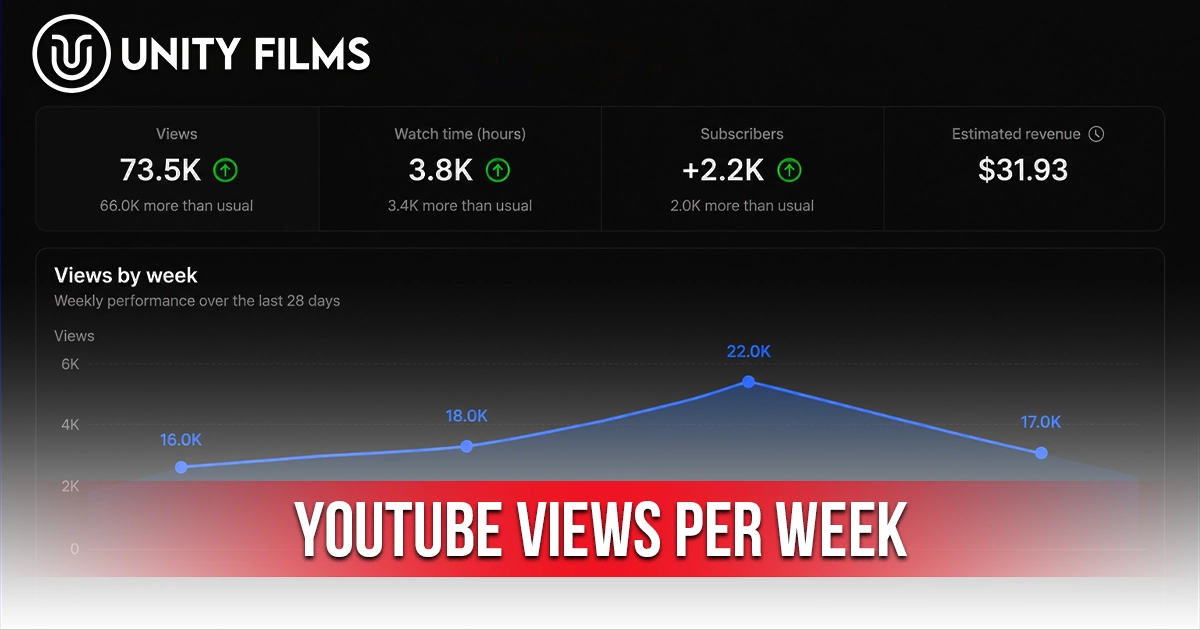
Most creators are addicted to checking their YouTube view count daily. The honest problem is that daily numbers swing wildly one strong upload, one slow Tuesday, and you’ve already convinced yourself the channel is dying or thriving when neither is true. YouTube views per week is the metric that actually filters out that noise and shows you what’s really happening.
Across channels we’ve worked on, the shift from daily to weekly tracking is one of the quietest growth habits successful creators share. Daily numbers are emotional. Weekly numbers are diagnostic. They smooth out the random spikes and show you the trend line that matters whether your channel is gaining, holding, or losing momentum.
This guide walks through what YouTube views per week means, realistic benchmarks by channel size, how weekly views differ from daily and total views, why serious creators prefer weekly tracking, and how to use this metric to make smarter content decisions in 2026.
Quick Answer: How Many YouTube Views Per Week Is Considered Good?
There’s no universal “good” number for YouTube views per week. Healthy weekly numbers depend on channel size, niche, upload frequency, and library depth. Use these brackets as a starting reference, not a fixed rule.
| Channel Stage | Subscribers | Typical YouTube Views Per Week |
|---|---|---|
| New channel | Under 1,000 | 35 to 350 |
| Small channel | 1,000 to 10,000 | 350 to 3,500 |
| Growing channel | 10,000 to 100,000 | 3,500 to 35,000 |
| Established channel | 100,000+ | 35,000 to 350,000+ |
These brackets work out to roughly 7x your healthy daily view range, which makes sense because a week is just seven days. The numbers vary heavily by niche, though. A finance or tech channel will often pull bigger weekly numbers at the same subscriber count than a hyper-specialized hobby channel.
If you’re significantly below your bracket, the issue is almost always CTR or retention on recent uploads, not a fundamental channel problem. If you’re well above it, the algorithm is actively pushing your content and you should double down on whatever you’re doing right now.
For real-time tracking and per-day expectations, our deep dive on YouTube views per day covers the daily side of this same picture in detail.
What Are YouTube Views Per Week?
YouTube views per week is the total number of times your videos are watched across your channel during any 7-day window. You can see this in YouTube Studio under Analytics → Overview, where the default view shows the last 28 days broken out by day. Set the date range to 7 days to see your current weekly total, or use the 28-day view divided by four for a rolling average.
The metric matters because it filters out short-term noise. A great Wednesday upload can make your daily views look brilliant. A quiet Monday can make them look broken. Neither tells you much on its own. Weekly views average those swings out and reveal the underlying trend.
Why creators should track YouTube views per week:
- It reflects content patterns, not random fluctuations. One bad day means nothing. One bad week is a signal worth investigating.
- It matches publishing cadence. Most creators upload weekly or twice-weekly, so weekly tracking aligns naturally with content cycles.
- It’s how the algorithm thinks at scale. YouTube evaluates channel performance over rolling windows, not individual days.
- It’s the format used in industry reporting. Agencies, sponsors, and managers compare weekly numbers, not daily ones.
There’s a reason YouTube Studio’s analytics dashboard defaults to multi-day windows rather than today’s number alone. Single-day snapshots are too volatile to drive content decisions, especially for smaller channels.
YouTube Views Per Day vs Per Week vs Total: Which Should You Track?
These three metrics measure completely different things, and confusing them leads to wasted time and bad content decisions. Each has its place in a creator’s workflow.
| Metric | What It Measures | Best Used For |
|---|---|---|
| Daily views | Real-time momentum | Spotting today’s outliers, ad revenue tracking |
| Weekly views | Sustained pattern | Content decisions, channel health, reporting |
| Total views | Lifetime performance | Social proof, milestones, sponsor pitches |
Daily views measure the moment. They’re useful for spotting individual viral hits, tracking immediate ad revenue, or noticing same-day spikes from a feature in suggested videos. The downside: they fluctuate too much to base decisions on. A single video published in the morning can double your daily count without representing real channel growth.
Weekly views measure the pattern. They’re the sweet spot for content decisions. Strong weekly numbers signal the channel is genuinely on track. Weak weekly numbers mean something needs adjusting packaging, retention, or upload cadence. The weekly window is long enough to filter daily noise and short enough to feel actionable. For a deeper breakdown of how weekly views interact with daily momentum, our YouTube views per day guide covers the real-time side of the equation.
Total views measure history. They’re useful for sponsorship pitches, social proof, and long-term progress markers, but they tell you nothing about whether the channel is healthy right now. A channel with 10 million total views could be growing fast or fading quietly total views can’t differentiate the two.
The smartest creators we’ve worked with check daily views once a day for revenue and outliers, review weekly views every Monday for content decisions, and glance at total views monthly for milestones. That rhythm filters the noise without missing the patterns.
Why Weekly Tracking Beats Daily Tracking for Most Decisions
The contrarian truth most guides skip: daily tracking creates anxiety. Weekly tracking creates clarity.
Three reasons weekly outperforms daily for content decisions:
- It absorbs randomness. YouTube tests every video on different audience segments over multiple days. A 24-hour view is essentially a single sample point. Seven days gives you a real average.
- It matches how the algorithm thinks. YouTube’s distribution decisions are made on rolling windows of 7 to 28 days. Tracking on the same time scale keeps your perspective aligned with the system.
- It saves emotional energy. Most daily drops are noise. Most weekly drops are signal. Checking daily wastes attention on fluctuations that mean nothing.
This is why YouTube creator analytics platforms recommend weekly reviews as the default cadence for content decisions, with daily checks reserved for revenue and emergency diagnostics. YouTube’s analytics also update with a 24-48 hour lag, making daily checks even less reliable.
I’m not 100% convinced weekly is the perfect window for every creator Shorts-heavy channels and trending news creators may benefit from tighter cycles. But for the vast majority of long-form-focused channels, weekly is the right unit of measurement.
What Affects YouTube Views Per Week (And Why Yours Are Normal)
Your weekly views are shaped by far more than video quality. Five factors explain almost every variation between channels at similar subscriber counts.
- Upload frequency. A channel uploading 3 videos a week typically out-pulls a weekly uploader by 2-3x, simply by having more inventory in the algorithm’s testing pool.
- Library size. A two-year-old channel with 100 videos pulls bigger weekly numbers than a six-month-old channel with 25, at the same subscriber count. Old videos compound.
- Niche audience size. Personal finance, tech, gaming, and education have larger total audiences than highly specialized niches, which translates directly into bigger weekly view potential.
- Recent upload performance. One strong upload in the past week can lift your weekly views significantly. One weak upload can drag them down. Look at the average over multiple weeks.
- Shorts mix. Channels publishing Shorts regularly often see weekly view totals 5-10x higher than long-form-only channels at the same subscriber count.
Comparing your weekly views to another creator’s even in the same niche is mostly misleading. The honest test is whether your own weekly numbers are trending up, flat, or down over the past 4-6 weeks. That comparison is the only one that matters.
How to Track YouTube Views Per Week in YouTube Studio
Tracking weekly views takes two minutes. Most creators never set up their analytics workflow properly and end up checking dashboard numbers without context.
From desktop:
- Step 1: Open YouTube Studio at studio.youtube.com
- Step 2: Click Analytics in the left sidebar
- Step 3: Change the date range in the top-right corner to Last 7 days
- Step 4: Note the total Views number that’s your current week
- Step 5: Switch to Last 28 days to see the previous three weeks for comparison
The Advanced Mode option lets you export weekly data into a spreadsheet for deeper tracking essential as your library grows past 30-40 videos.
A useful habit: every Monday, check last week’s views against the previous three weeks and write down one observation. Over six months, those notes become the most honest analytics journal you’ll ever keep. Our YouTube channel stats guide covers the broader metrics framework that pairs with weekly tracking.
YouTube Views Per Week by Channel Profile: A Detailed Look
The earlier brackets give you a starting reference. The framework below adds more detail once you account for upload frequency and content type.
| Channel Profile | Typical Weekly Views |
|---|---|
| New, weekly long-form upload | 35 to 200 |
| New, 2-3x weekly + Shorts mix | 200 to 1,000 |
| Small, weekly upload, evergreen content | 500 to 3,000 |
| Small, 3x weekly + Shorts mix | 2,000 to 8,000 |
| Growing, weekly upload, established niche | 5,000 to 20,000 |
| Growing, 3x weekly + Shorts | 15,000 to 50,000 |
| Established, weekly long-form | 25,000 to 150,000 |
| Established, daily upload + Shorts | 100,000 to 500,000+ |
Channel size alone doesn’t tell the whole story. Upload frequency and content mix can double or triple weekly view potential at any subscriber count. Benchmark-shopping (looking at other channels and trying to match them) rarely works because their upload pattern almost certainly differs from yours.
If you’re consistently in your bracket, you’re healthy. If you’re stuck below, the next section covers what to actually do.
How to Increase YouTube Views Per Week (Without Burning Out)
This section is intentionally short because the strategies that increase weekly views are the same ones that increase daily views they just compound over a longer window. The full playbook lives in our deep dive on YouTube views per day, which covers all 10 growth strategies.
Quick summary that applies specifically to weekly numbers:
- Increase upload frequency carefully. Going from 1 to 2 uploads per week typically lifts weekly views if quality holds. Going from 1 to 4 usually doesn’t, because quality drops.
- Build playlists for binge sessions. A viewer who watches three of your videos in one session signals stronger channel value.
- Layer Shorts on top of long-form. Shorts lift weekly view counts dramatically and drive new viewers to long-form content.
- Audit weak old videos. Old uploads with proven retention but weak CTR are usually one thumbnail swap away from contributing again.
- Stay consistent for at least 90 days. Steady cadence beats inconsistent batching, even when the inconsistent channel has more total uploads.
Honestly, the biggest mistake creators make is changing strategy week by week. Pick two changes, give them four to six weeks, and let the weekly numbers tell you whether they’re working. Anything shorter is noise.
The Contrarian Truth About YouTube Views Per Week
This is where most guides get it wrong. They treat weekly views as a number to maximize. They aren’t.
Weekly views are a diagnostic tool, not a goal. The real goal is sustained channel health strong returning viewers, deep library, clear niche positioning. Weekly views are how you measure whether those underlying factors are improving. Chase weekly views directly and you’ll end up making clickbait that spikes once and dies.
Probably more important than tracking the number is tracking the trend. A channel pulling 5,000 weekly views with the line gently rising over six months is in better shape than a channel pulling 15,000 weekly views with a flat or falling trend. The direction matters more than the absolute number.
Most beginners check weekly views obsessively and panic when one week drops. Smart creators track six-week trend lines and ignore single-week variation.
Frequently Asked Questions
How many YouTube views per week is good?
There’s no single answer because it depends on channel size, niche, and upload frequency. As a starting reference, expect 35-350 weekly views for a new channel under 1,000 subscribers, 350-3,500 for a small channel under 10,000, and 3,500-35,000 for a growing channel.
Should I check YouTube views daily or weekly?
For content decisions, weekly is almost always better. Daily fluctuations are too noisy to drive smart adjustments. Use daily views for revenue tracking and spotting individual viral outliers. Use weekly views for diagnosing patterns and judging recent content changes.
Why did my YouTube views drop this week?
The most common cause is weaker CTR or retention on recent uploads, which signals the algorithm to slow distribution. Other causes include long gaps between uploads, topic drift, or seasonal audience shifts. A single weak week is usually noise; a sustained three to four week drop is a signal worth diagnosing.
How are YouTube weekly views different from daily views?
Weekly views average out daily fluctuations and show the trend. Daily views show real-time momentum. Daily views help with revenue tracking and spotting outliers; weekly views are better for content decisions and channel health checks.
Where do I find weekly views in YouTube Studio?
Open YouTube Studio, click Analytics in the left sidebar, then change the date range in the top-right corner to “Last 7 days.” The Views number is your current week. Switch to “Last 28 days” to see the previous three weeks.
Also Read: How Many YouTube Views Per Day Is Good? Everything You Need to Know
Final Thoughts
YouTube views per week isn’t a number you stare at and panic over. It’s a diagnostic instrument telling you whether your channel is genuinely on track over time windows long enough to be honest.
The shift is psychological. Stop refreshing daily. Start checking weekly and writing down what you notice. Every Monday, take five minutes to compare last week against the past month. Six months of that habit will teach you more about your channel than any guide ever could.
So pick a Monday. Open YouTube Studio, switch to Last 7 days, note the number, and ask one question: is this week better than the average of the last four? That single comparison is the most useful weekly habit you can build. Or if you’d rather skip the analytics work entirely and have a team handle channel growth, reporting, and strategy end to end, Unity Films YouTube Management Services covers the full stack so you can focus on showing up on camera.